Credit Card Portal on NetBanking

Looking for an easier way to manage your HDFC Bank Credit Card? HDFC Bank’s Credit Card Portal on NetBanking lets you access all your card details in one place. Track transactions, make payments, redeem reward points, and manage limits seamlessly. It’s a secure, 24x7 platform designed to give you complete control over your card, anytime and anywhere.

CTA: Register Online

Credit Guarantee Fund Trust For Micro And Small Enterprises CGTMSE

Overview of Credit Card NetBanking

Managing your HDFC Bank Credit Card through NetBanking gives you convenience, control, and security — all in one place.

24x7 Account Access: Check balances, transactions, and limits anytime, anywhere. No need to visit a branch.

Faster Bill Payments & Instant Alerts: Pay your Credit Card bills instantly and get real-time updates on transactions and due dates.

Enhanced Security & Control: Manage your card usage securely by setting limits, enabling or disabling features, and monitoring transactions in real time.

With HDFC Bank Credit Card NetBanking, you can manage, monitor, and maximise your card benefits anytime, anywhere.

View: Check your cash and credit limits, billed and unbilled transactions, due dates, and reward points in one place.

Transact: Pay bills, register a new card, hotlist a lost card, set up AutoPay, change your ATM PIN, or request an email statement.

Special Services: Enjoy exclusive features like Cash on Call (instant Cash Loans) and Dial an EMI (convert purchases into easy EMIs).

Upgrade & Enhance: Request a credit limit increase or apply for a card upgrade directly through NetBanking. 
How to Get Started

  • Step 1: Log in to NetBanking 

    Use your Customer ID and password to securely log in to HDFC Bank NetBanking.
  • Step 2: Go to the Credit Card Tab 

    Navigate to the ‘Credit Card’ section available on your NetBanking dashboard.
  • Step 3: Register Your Card 

    Click on ‘Register New Card’ and follow the on-screen instructions to complete your registration.

Prerequisites to Book a Bank Appointment

Before you schedule your appointment, please ensure you meet the following basic requirements:

  • You must be above 18 years of age
  • You must be a Resident Indian with an active Savings Account
  • Your registered email ID or mobile number should be handy and available for validation

Documents Required to Update Email ID in Your Bank Account

Identity Proof

  • Aadhaar Card
  • PAN Card
  • Passport
  • Driving Licence
  • Voter ID

Customer Request Form

  • Fill and sign the Customer Request Form at the branch to update your registered email ID at the bank branch.

Self-Attested Document Copy

  • Submit a self-attested photocopy of the identity proof along with the request form.

Know More About Credit Card Activation

Tips for Safe Card Activation

Keep your Credit Card activation process secure by following these essential tips:

  • Use Official Bank Channels Only: Always activate your card through HDFC Bank’s verified platforms such as NetBanking, MobileBanking App, MyCards, or official WhatsApp Banking. 

  • Do Not Share Sensitive Information: Never share your PIN, OTP, or card details with anyone, including callers claiming to represent the bank. 

  • Verify Confirmation Messages: After activation, check for a confirmation SMS or email from HDFC Bank to ensure your card is securely activated. 
No need for collateral

Post Activation Considerations

Once your Credit Card is activated, follow these steps to make the most of its features while ensuring safety and convenience:

  • Set Your PIN & Enable Usage: Create your 4-digit PIN and activate domestic or international usage based on your spending preferences. 

  • Add to Mobile Wallet & Enable Contactless Payments: Link your card to your preferred mobile wallet for seamless tap-and-pay convenience. 

  • Register for Alerts & Set Spending Limits: Stay informed with transaction alerts and manage your spending through personalised limits. 

  • Enable Secure Authentication: Activate 3D Secure and app notifications for enhanced safety during online and in-store transactions.
No need for collateral

How to Confirm Credit Card Activation

You can check if your Credit Card is activated in the following ways:

  • Online Banking Platforms: Log into your NetBanking and Mobile Banking portal. Active Credit Cards will be displayed in the Credit Card or Pay section.

  • Customer Service: Call the bank directly to know if your Credit Card is active. 

No need for collateral

Frequently Asked Questions

Visit the HDFC Bank NetBanking login page, click ‘Register New Card’, and follow the on-screen steps. Enter your Credit Card details, verify using OTP, and set your password to activate online access instantly.

Yes, you can link and manage multiple HDFC Bank Credit Cards using a single NetBanking login. View transactions, make payments, and redeem rewards across all linked cards conveniently in one secure dashboard.

No, accessing and managing your HDFC Bank Credit Card via NetBanking is completely free of charge. Enjoy 24x7 access to statements, payments, and services without any hidden fees.

If you lose access to your registered mobile number or email, visit your nearest HDFC Bank branch or contact customer care to update your details and securely restore NetBanking access.

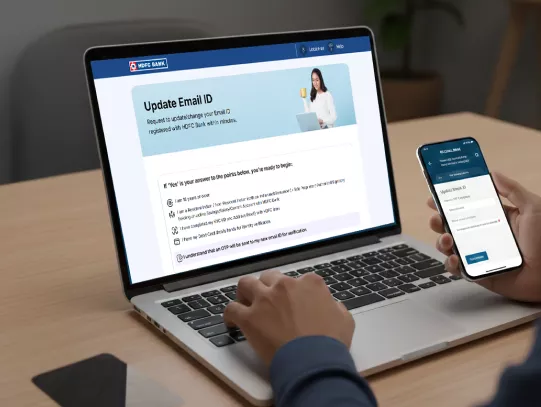
Update Your Email ID in HDFC Bank Account Now!