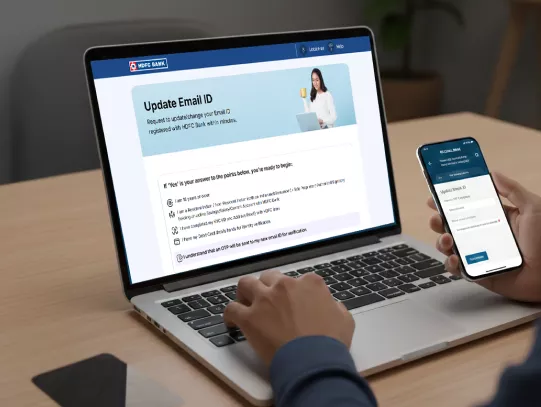


एच डी एफ सी बैंक अकाउंट में अपनी ईमेल ID कैसे अपडेट करें?

​​​आपकी ईमेल ID केवल एक संपर्क विवरण से अधिक है. यह एच डी एफ सी बैंक से ई-स्टेटमेंट, ट्रांज़ैक्शन अलर्ट और महत्वपूर्ण अपडेट का गेटवे है. it करंट बनाए रखने से निर्बाध सेवाएं सुनिश्चित होती हैं और डिजिटल सुरक्षा को बढ़ाने में मदद मिलती है. एच डी एफ सी बैंक ऑनलाइन या ऑफलाइन बैंक अकाउंट में ईमेल ID अपडेट करने के कई तरीके प्रदान करता है, ताकि आप अपने लिए सबसे अच्छा विकल्प चुन सकें.
 

How to Update Your Email ID in HDFC Bank Account?

बैंक अकाउंट में ईमेल ID बदलने से पहले आवश्यक शर्तें

निवासी व्यक्ति/AUS/BO:

  • आप नेटबैंकिंग, मोबाइल बैंकिंग या इंस्टा सर्विसेज़ के माध्यम से अपनी ईमेल ID को डिजिटल रूप से अपडेट कर सकते हैं.
  • आप अपनी ईमेल ID अपडेट करने के लिए ब्रांच में फिज़िकल फॉर्म भी सबमिट कर सकते हैं.
  • CTA: इंस्टेज सर्विसेज़ | नेटबैंकिंग | ब्रांच खोजें

अनिवासी भारतीय:

  • आप नेटबैंकिंग, मोबाइलबैंकिंग, ATM, WhatsApp या इंस्टा सर्विसेज़ के माध्यम से अपनी ईमेल ID को डिजिटल रूप से अपडेट कर सकते हैं.
  • वैकल्पिक रूप से, आप अपनी रजिस्टर्ड ईमेल ID के माध्यम से अपने ID प्रूफ की स्व-प्रमाणित कॉपी के साथ संपर्क विवरण अपडेट करने का फॉर्म सबमिट कर सकते हैं, या ब्रांच में जा सकते हैं.
  • CTA: इंस्टेज सर्विसेज़ | नेटबैंकिंग | फॉर्म डाउनलोड करें

एकल स्वामित्व:

  • आप इंस्टा सर्विसेज़ के माध्यम से अपनी ईमेल ID डिजिटल रूप से अपडेट कर सकते हैं.
  • आप ब्रांच में भी जा सकते हैं और अपने ID प्रूफ (OVD) के साथ फिज़िकल फॉर्म सबमिट कर सकते हैं.
  • CTA: ऑनलाइन अपडेट करें | ब्रांच खोजें

अन्य सभी गैर-व्यक्ति:

  • पार्टनरशिप फर्म, प्राइवेट/पब्लिक लिमिटेड कंपनी, LLP, HUF, TASC आदि फॉर्म सबमिट करने के लिए ब्रांच में जाकर अपनी ईमेल ID अपडेट कर सकते हैं.

अपने बैंक अकाउंट में ईमेल ID अपडेट करने के लिए आवश्यक डॉक्यूमेंट

पहचान का प्रमाण

  • आधार कार्ड
  • पैन कार्ड
  • पासपोर्ट
  • ड्राइविंग लाइसेंस
  • वोटर ID

कस्टमर रिक्वेस्ट फॉर्म

  • बैंक ब्रांच में अपनी रजिस्टर्ड ईमेल ID अपडेट करने के लिए ब्रांच में ग्राहक अनुरोध फॉर्म भरें और हस्ताक्षर करें.

स्व-प्रमाणित डॉक्यूमेंट की कॉपी

  • अनुरोध फॉर्म के साथ पहचान प्रमाण की स्व-प्रमाणित फोटोकॉपी सबमिट करें.

Methods to Update Email ID in Your Bank Account

वेबसाइट के माध्यम से

  • Go to www.hdfc.bank.in and in the menu, select Need Help > Accounts/Deposit Services > Update E-mail ID
  • Enter your registered mobile number along with DOB/PAN/customer ID for verification.

  • रजिस्टर्ड मोबाइल नंबर पर प्राप्त OTP दर्ज करें.

  • Read and agree to the terms and conditions and submit the OTP.

  • Enter your new email ID in the “enter new email address” field and verify using the OTP received on your new email ID.

  • Confirm your identity by entering the last 4 digits of your Debit Card ATM PIN, expiry date, and CVV. You can also confirm your identity through NetBanking via your user id and password. Your new email ID will be updated after 48 hours.

  • Submit and wait for confirmation via SMS/email.

शुरू करने के लिए यहां क्लिक करें

No need for collateral

ब्रांच विज़िट के माध्यम से

  • Collect the appropriate form from the branch.

  • Fill in all the details, including your new email ID.

  • Authenticate yourself via Aadhaar biomterics or provide a valid OVD.

  • Submit it at the nearest HDFC Bank branch to you. 

  • Collect an acknowledgement slip for tracking.

MI support 

Know More About Email ID Change in Bank Account

  • OTP Not Received: Ensure your mobile network is stable and your number is updated with the bank.

  • Incorrect Email Format: Double-check for typos.

  • Unlinked Mobile Number: Update your mobile number first if it’s outdated.

  • Branch Delays: Processing may take up to a few working days.

  • Receive timely account alerts and e-statements.

  • Enhance security for online transactions.

  • Reduce the risk of missing critical updates about products or regulatory changes.

  • Keep your registered mobile number active for OTPs.

  • Ensure the new email ID is accessible before initiating the change.

  • Each Joint Account holder should update their email ID individually if required.

  • If confirmation is not received within a few days, contact HDFC Bank PhoneBanking. 

सामान्य प्रश्न

Email ID updation via Instaservice/ NB/ MB is done after 48 hours. Physical form request may take longer.

HDFC Bank does not charge customers for updating their email ID.

You’ll receive an SMS and/or email confirmation once your email ID is successfully updated.

You can change email ID in Bank Account online through MobileBanking, Phone Banking or InstaServices without visiting a branch.

Update Your Email ID in HDFC Bank Account Now!