Open your Savings Account instantly with InstaAccount in just 4 steps. You get cardless ATM withdrawals, easy online payments, and instant access to NetBanking and MobileBanking. Anyone aged 18 or older who is an Indian resident and does not already have an HDFC Bank account can start. Video KYC lets you verify your details securely from anywhere. With zero charges, seamless onboarding, and digital services, you can unlock exclusive offers and enjoy best-in-class benefits. Start your journey today—your trusted financial partner makes banking made easy.

Key Benefits

Things to Know Before Opening an InstaAccount
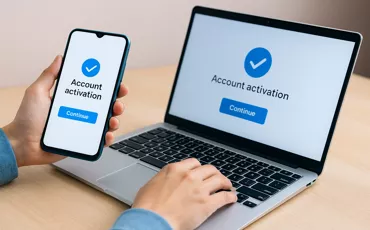
InstaAccount offers a fully digital, contactless process to open a Savings Account instantly.
New accounts include NetBanking and MobileBanking activation for immediate digital transactions and fund transfers.
Eligibility is for Indian residents, 18 years and above, without an active HDFC Bank account.
Video KYC verification is a mandatory step that enables secure activation from any location.
Account features include cardless ATM withdrawals, zero charges, and integrated online services.

Know More About Instant Savings & Salary Account
-
Fees & Charges
-
Ways to add money
-
Deals & Offers
-
Most Important Terms and Conditions

Wondering If You Are Eligible?

Documents required to get you started
Officially Valid Documents (OVDs) for establishing Proof of Identity And Mailing Address
Click here to know complete documentation details


Ways to Open a Bank Account


Frequently Asked Questions
HDFC Bank’s InstaAccount journey is a fully digital, no contact process that helps you open a savings account. Be it our Regular Savings Account or our premium SavingsMax account, open it instantly from the comfort of your home. You will also get your account number and Customer ID instantly post completing your Video KYC.
You have to maintain the Average Monthly Balance (AMB) / Average Quarterly Balance (AQB) as per Regular Savings Account till completion of full KYC. Post completion of full KYC (via Video KYC or branch visit), the product features, benefits and charges would be applicable basis the product that you have selected during the Insta-Account Opening process.
Your account is pre-set with Net and MobileBanking which means you can start banking using the HDFC Bank Savings Account as soon as you add money in your account
Here are the benefits you can get:
You can open this account by yourself in 10-15 minutes.
You will get your account number and customer ID post Video KYC from the comfort of home.
Your account comes pre-set with Net and MobileBanking so you can start using it for your banking as soon as you fund your account
With InstaAccount you can do all your banking including paying bills, sending and receiving money, withdrawing cash from HDFC Bank ATMs etc.
You can also open a Fixed Deposit using your InstaAccount
You can simply click here or download the HDFC Bank Instant Account app from Playstore.
Opening this account is simple and instant as long as you have a working mobile number and Aadhaar.
Just complete the details required and validate yourself using your Aadhaar.
You are pre-registered for NetBanking. All you need to do is set your password. You will be provided a link in the email sent to you once your account number is generated to set your IPIN based on a split OTP (you will receive part of your OTP on email and part of your OTP on mobile). Once you have opened your account and set your NetBanking password, you can transfer money into this account from elsewhere. Your salary can be credited to your HDFC Bank InstaAccount as soon you get the account number. Once your NetBanking password has been set during the account opening process, you can do all your banking using this account.
Resident Indian individuals who are 18 years and over and do not have an existing HDFC Bank account.
No. NRIs, HUFs, existing HDFC Bank customers cannot open an HDFC Bank InstaAccount
No. This account can only be held by one individual
Select the HDFC Bank branch closest to you.
Enter the first three characters of your company name and select from the list
Your current mobile number should be registered with the UIDAI / Aadhaar website for you to receive the OTP for authentication / validation.
You will also need to ensure you are in a good network area.
Yes. You can use other forms of ID like your Passport, Driving License or Voter ID Card. However, you will not receive an account number instantly in these cases. The HDFC Bank branch team will contact you before the account number is issued.
Yes, your mailing address and permanent address can be different.
No, providing a mailing address is not mandatory for Aadhaar verification.
Details like name and address fetched from UIDAI cannot be modified. Your account will be opened using these details.
Yes. Accounts can be opened with Aadhaar Card copy, Driving License, Voters ID Card, or Passport. However, you will not receive an account number instantly in these cases. The HDFC Bank branch team will contact you before the account number is issued.
You will need a PAN/PAN acknowledgment if your annual income is more than ₹2.5 lacs
No, using Aadhaar is not mandatory. However, it makes the process faster and simpler for you since validation of your details happens quickly and you get your account number instantly with Aadhaar.
Using KYC documents like your Passport, Driving Licence or Voter ID Card is a slower process since HDFC Bank will have to contact you before you receive your account number.
No, you don’t need to upload your PAN card copy. Just mention your PAN number.
If you have used your Aadhaar, then you would have received your account number instantly. If you are using other ID documents, you can check the status of your application using the Reference Number provided by clicking on this link – Track My Application
You will receive your Customer ID and account number as soon as your Video KYC is completed post online form completion. If you have used other forms of ID, this will take some time since our Branch Team will need to contact you before the account number is issued.
The account number will not be generated instantly if you are using any other form of ID other than Aadhaar. You will be provided with a Reference Number till the authentication/validation process is completed by our Branch team. You can check the status of your application using the Reference Number provided by clicking on the link – Track My Application.
You will need good network connectivity to complete the account opening process.
Your account will come NetBanking enabled, you will need to simply activate it. You will receive an SMS, e-mail with instructions on how to do this.
You are pre-registered for NetBanking. All you need to do is set your password. You will be provided a link in the e-mail sent to you once your account number is generated to set your IPIN basis spilt OTP (you will receive part of your OTP on e-mail and part of your OTP on mobile)
Your account will be Closed.
- You can pay bills, recharge & schedule payments
- You can shop and pay online securely
- You can transfer money
There are no charges associated with this account.
Yes, these features on your account will be available once you have completed Video KYC formalities and generated your Account Number and Customer ID.
No. However, you can immediately transfer money to your account digitally (ideally within 3 days) to start using the account.
You will receive your HDFC Bank InstaAccount number and Customer ID immediately. We will also send you a NetBanking activation link during the account opening process. While opening the account you will also be asked for confirmation if you would like to transfer money to third parties.
HDFC Bank InstaAccount does not offer a Debit Card or Cheque Book. You can manage all your transactions as well including cash withdrawals digitally.
You can use your mobile phone to withdraw cash from any HDFC Bank ATM. Just press the Cardless Cash Withdrawal option and follow the instructions. A charge of ₹25 plus taxes is applicable per transaction.
Yes, you will be able to resume from the point you dropped off.
No, to change E-mail ID for your InstaAccount, please complete Full KYC at any nearest branch.
Grow your savings today with flexible, safe and easy banking.


