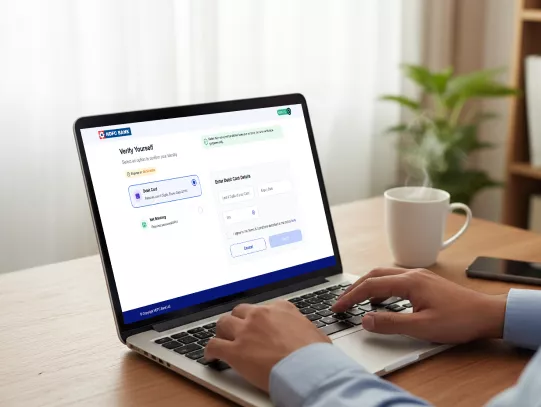
How to Set Up Smart Standing Instructions with HDFC Bank?

​​​Managing recurring bill payments can be time-consuming. With smart standing instruction and eNACH registration, you can automate bill payments securely. HDFC Bank makes this process simple through several options.

Credit Guarantee Fund Trust For Micro And Small Enterprises CGTMSE

Methods for eNACH Registration

InstaServices

  • Navigate to the InstaServices section on the HDFC Bank website.

  • Scroll to "Smart Standing Instructions" and click on "Register SI" to begin.

  • Click on 'Let's Begin' after you get redirected to the registration.

  • Enter your mobile number and DOB/PAN card/Customer ID.

  • Enter the OTP received on the registered mobile number and click "Submit" to proceed.

  • Select either Debit Card or NetBanking as a payment mode.

  • Choose the Account where you want the amount to be credited.

  • Provide details of the non-HDFC Bank Account for which you are setting up the standing instruction. 

  • Carefully review the terms and conditions and double-check your details.

  • Click "Continue" to submit the request.

  • You are going to be redirected to the NetBanking page of your non-HDFC Bank Account for authorisation.

  • Once authorised, your smart standing instruction request will be successfully submitted.

  • By using HDFC Bank InstaServices, you get a faster, paperless experience while retaining full control over your payments.

Click here to get started

No need for collateral

NetBanking

  • Log in to HDFC Bank NetBanking or Mobile App.

  • Go to BillPay & Recharge > Add Biller.

  • Select Standing Instruction and your preferred payment method (NetBanking or Debit Card).

  • Enter merchant/biller details, frequency of payment, and amount. 

  • Authenticate using the OTP sent to your registered mobile number.

  • Review details and submit to complete eNACH registration.

MI support 

HDFC Bank Branch

  • Visit your nearest HDFC Bank branch to set up eNACH mandate registration offline.

  • Fill out the standing instruction/eNACH mandate registration form.

  • Provide merchant/biller details and Bank Account information.

  • Sign and submit the registration form along with KYC documents (Aadhaar, PAN). 

  • Collect the acknowledgement for your records.

MI support 

Required Documents

Before initiating eNACH registration, keep these ready:

  • Active HDFC Bank Account (Savings/Salary/Current).

  • Valid Debit Card or NetBanking credentials.

  • Aadhaar/PAN for authentication. 

  • Updated mobile number to receive OTPs.

  • Merchant/biller details and frequency of payment.

MI support 

Important Things to Remember

  • Ensure your biller details are accurate to avoid failed payments.

  • Each Joint Account holder must authorise separately.

  • If your mobile number or email changes, update it before setting up a mandate.

  • You can edit or cancel mandates anytime via NetBanking or a branch. 

  • Never share OTPs; review SMS alerts to monitor transactions.

MI support 

Pre-requisites for eNACH Registration

  • I am an Indian resident, above 18 years of age, with an active Savings account.
  • I am the primary holder of both a Debit Account (Other Bank) and a Credit Account (HDFC Bank).
  • I have completed my KYC (ID and address Proof) with HDFC Bank.
  • I have my HDFC Bank Debit Card/NetBanking details handy for identity verification.
  • My mode to operate HDFC Bank Account is Single/Either or Survivor.

Overview of eNACH Registration

  • eNACH registration is a digital process that lets you authorise HDFC Bank to debit recurring bill payments directly from your Bank Account.

  • eNACH registration differs from traditional standing instructions because it is entirely online, faster, and managed under the NPCI eMandate framework.

  • It aligns with RBI guidelines, providing more transparency, pre-debit notifications, and easy cancellation.

  • With eNACH mandate registration, your payments are automated, reducing the risk of missed due dates. 

  • You authorise HDFC Bank to debit a fixed or variable amount towards a registered merchant or service provider.

  • Your Account details, mobile number, and Debit Card credentials are used for secure authentication.

  • As per RBI rules, you receive an SMS notification before every debit. This SMS includes a link to view, modify, or cancel the upcoming payment.

  • This system offers better control and higher transparency compared to older methods. 

HDFC Bank's smart standing instruction system is designed with your security in mind:

  • Fully compliant with PCI-DSS, NPCI, and RBI guidelines.

  • SMS alerts before every debit give you greater control.

  • Instant set-up and cancellation options through NetBanking or a branch. 

  • No need to remember due dates; your bills are managed automatically.

Frequently Asked Questions

Aadhaar can be used for authentication, but PAN or other valid ID proof may also be accepted as per current KYC norms.

The process is secured by multi-factor authentication, RBI guidelines, and PCI-DSS compliance. SMS notifications before each debit give you extra control.

You can log in to NetBanking or visit a branch to modify or cancel your standing instructions. Changes take effect as per the next billing cycle.

Typically, auto-debits start within a few working days after successful eNACH mandate registration. Timelines may vary by merchant.

Currently, HDFC Bank does not levy charges for eNACH registration or cancellation. Merchant-specific fees, if any, may apply.

Set Up Smart Standing Instructions with HDFC Bank Now!